



Our Mobile App is the most secure way to bank with us online.
Our feature-rich Mobile App provides enhanced online banking protection and user experience. It extends the capability of our Internet Banking, making it safe, quick and easy to manage your money in the palm of your hand.
What's great about our Mobile App?
High security
24/7 access
User-friendly and packed with everyday features
How do I get the app?
-
Register for Internet Banking.
You must be registered for Internet Banking before you can access the Mobile App. -
Download the App.
Available on the App Store or Google Play, free of charge.
New features.
Thanks to your feedback, we have added some additional features to make our award-winning app even better. These improvements include:
- customisable dashboard that allows you to see what is most important to you once you log in
- view, create and schedule payments, open accounts, activate, cancel, order replacement cards, view your card details, and change your card PIN anytime
- use biometrics like Face ID and Touch ID/Fingerprint Unlock to securely log into the app
- view your balance and transfer money between your accounts without needing to log into the app
- use our spend tracker to track and compare your daily spending with previous months or use the search function to search transactions as far back as you like
- use the global search function to search keywords to navigate within the app
- the payday tracker is a helpful tool that illustrates your next payday with a personalised countdown progress bar on the dashboard
- now you can simply tap on your card details within "Manage Cards" and have them copied to clipboard with ease.
What's new.
Favourite account selection.
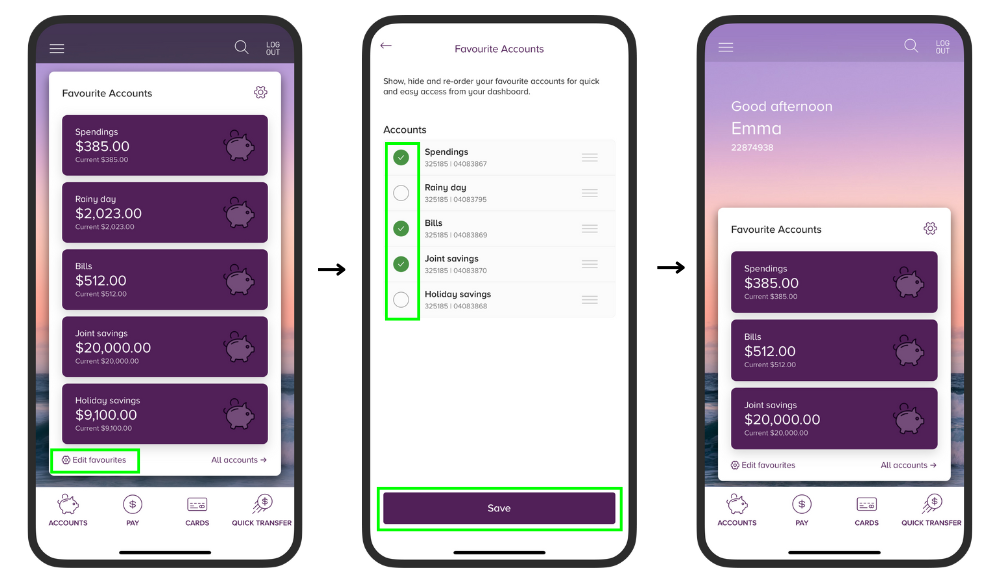 Want to control which accounts you see when you first log in? You can now manage your favourite accounts to make finding the right account quicker and easier.
Customise your look.
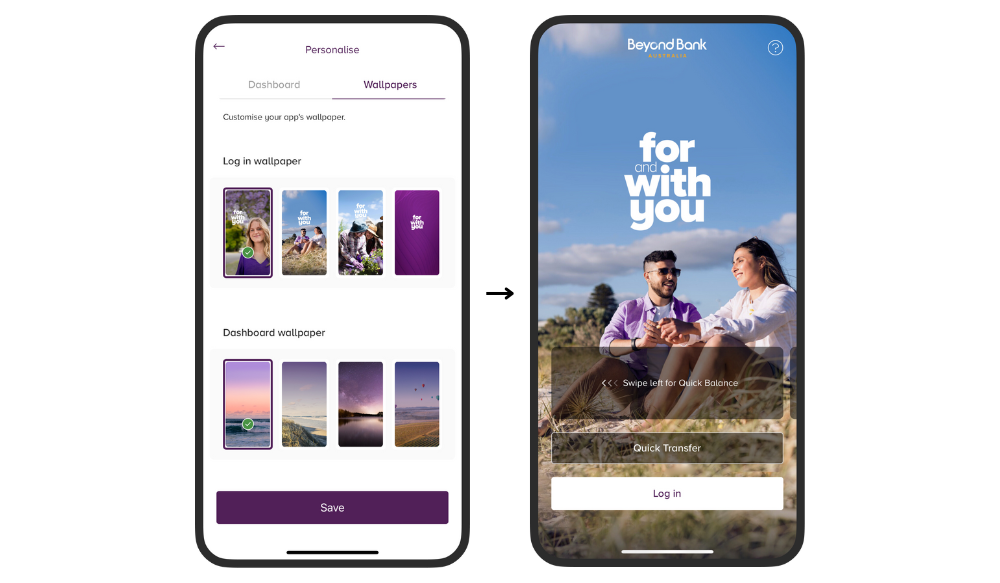 Select your own choice of wallpaper for the home screen and the dashboard screen to give the app your own custom feel.
Frequently Asked Questions.
- PayID: Send & receive money in minutes
- Pay a friend on the move. Add new payees when it’s convenient for you
- Apple Pay integration. Add your card to your Wallet directly from within the Beyond Bank app – no manual input required (iOS only)
- Schedule transactions and see a list of scheduled transfers
- See your pending transactions
- Change your transfer limits
- Keep track of your details on the go. Manage payments and purchases or check balances and bills anywhere, anytime
- Share your account details. Share your BSB and account number using the device's native share function. This usually includes SMS, email and any other sharing apps available on your device.
- Tap any transaction listed in your transaction history to see more information, including the time the transaction was made.
- Stay alert with additional Push Notifications. Keeping you informed when your balance reaches negative, or a payment is almost due or overdue.
Watch the following video to discover how easy banking is to do mobile payments with Beyond Bank mobile app.
Our Mobile Banking app for iOS and Android phones is packed full of an ever-expanding suite of innovative features!
Below is a list of all the features that we offer, and a video that you can view for a demonstration.
Account and General Information
- Product Information
- Calculators
- Overseas travel assistance
- Locate branches
- Secure Messaging
- Update your address
- View and manage eStatements
- Add account nicknames
- Add the new smartphone widget to access Quick Balance on your device without opening the app
- 3D touch/long press the Beyond Bank app icon on your device home screen for quick access to the most popular banking features
- Card Management
- Change Card PIN
- Set Up Apple Pay
- Cancel lost or stolen cards
- Reduce credit card limit
- Close credit card account
- Card controls including online and in-store purchases, contactless, digital wallet and ATM withdrawals.
Transfers
- BPAY
- Scheduled Payments
- External Transfers
- Transaction Listings
- Create PayID
- Change transaction limits.
Alerts
- General Alerts for:
- Direct Credits
- Direct Debits.
- Card Alerts for:
- Paywave/Paypass Transactions
- ATM Withdrawals
- EFTPOS Transactions.
- Account Alerts for:
- Threshold breaches
- Scheduled Balance Notifications.
- Touch ID and Fingerprint authentication
- Send secure messages about your accounts
- Forgotten your app login? Reset it at the touch of a button
- Control app timeout for personalised security settings
- Total control of your cards including online and in-store purchases, contactless, digital wallet and ATM withdrawals
- Stay in touch with us – update your details.
- Plan your next adventure! Advise your travel details or complete international transfers and payments
- Card controls including card blocking and cancellation. online and in-store purchases, contactless, digital wallet and ATM withdrawals
- Contact us. Get in touch with us, or use our app to securely message us.
- Keep track of your details on the go. Manage payments and purchases or check balances and bills anywhere, anytime
If you have already set up a Payday Countdown, you can edit this by tapping the Cog Wheel on the Payday Countdown widget.
We’re glad you’re happy. Feel free to share more!
Sorry to hear that! Please share how we can improve.
We are here to help.
|
Information about Canstar’s Customer Owned Institution of the Year for Digital Banking can be found here. |
|
|
Awarded Canstar Customer-Owned Bank of the Year for Digital Banking from 2015-2026. More information can be found at Canstar's 2026 Digital Banking Awards webpage. |
|
|
We do not charge a licence fee for the app, however you may incur data charges from your mobile network provider for downloading the application onto your mobile service. Check with your relevant service provider for more details. Whilst we endeavour to, the app is not compatible with all mobile devices or operating systems. To enjoy fee free mobile banking you must download our iPhone, iPad or Android phone app. Fee free banking applies to transactions conducted on accounts other than a Purple Bonus Saver, using iPad & iPhone version 13.0, or Android version 6.0 of our mobile banking application. iPhone and iPad are trademarks of Apple Inc. registered in the U.S. and other countries. Android is a trademark of Google Inc. |